


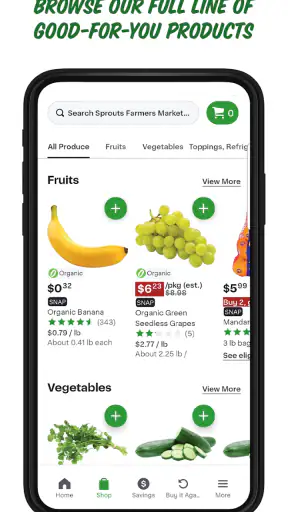
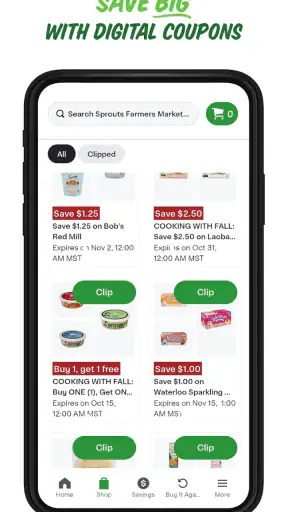
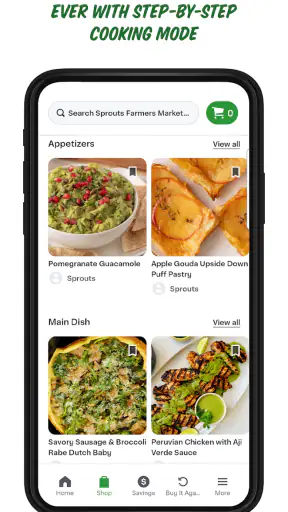
Shopping for healthier food is usually less about finding one perfect product and more about making several small decisions before the basket gets expensive. I found the Sprouts app useful because it puts the store experience on my phone instead of leaving me to remember everything while walking through the aisles. It is a free shopping app from Sprouts App Developer, aimed at everyday grocery planning rather than recipe obsession or general price comparison.
My first impression was that it works best as a companion to a planned visit. The store summary presents it as a way to make healthy living more affordable, but the practical value comes from how it can fit into the moments around a shopping trip: checking what is worth looking for, preparing a list, and making decisions while I am away from a computer. It is not a replacement for judgment at the shelf, and it does not remove the need to check products, quantities, or availability. What it does is reduce some of the mental load.
Sprouts has been available since late 2012, and its current Android release is version 21.30.0. That long presence helps explain why it feels like a mature store companion rather than a novelty. The app has reached over a million installs and holds a 4.8 average from around fifteen thousand ratings, with roughly five thousand reviews. Those figures do not guarantee that every shopping trip will be smooth, but they do suggest that the basic idea has proved useful to a substantial number of shoppers.
How the app fits into a connected shopping trip
What happens before I leave home
The most useful time to open Sprouts is before I am standing in the store. I can think through the week, decide which staples matter, and use the app as a reference while building a shopping plan. That sounds simple, but it changes the quality of the visit. Without preparation, a grocery trip tends to become a sequence of guesses: I remember needing something, forget which size, then compensate by buying an alternative that may not fit the meal or the budget.
I prefer to make a short list rather than treat the app as a reason to browse endlessly. A list organized around actual meals is more helpful than one organized around vague intentions such as “eat better.” For example, I might separate ingredients for breakfasts, quick lunches, and a few dinners, then leave room for fresh items I want to inspect in person. This approach keeps the app useful without allowing the phone to dictate every purchase.
The connection matters at this stage because the app is most comfortable when it can load current shopping information. I would not begin planning at the last second in a place with unreliable reception. A slow connection can turn a quick check into repeated waiting, especially when I am comparing several items or changing my plan. My practical tip is to do the main planning while I have dependable Wi-Fi or a strong mobile signal, then use the phone more selectively once I am on the move.
Why connectivity changes the in-store experience
Inside a store, a connected app can be convenient and distracting at the same time. If the screen loads quickly, I can glance at my plan, confirm what I came for, and keep moving. If the connection hesitates, the phone stops feeling like a helpful shopping tool and starts feeling like another queue. That difference is important for anyone who expects instant access in every aisle.
I also found that the app should support the trip, not become the trip. Grocery stores are physical environments, and the most important details are often right in front of me: packaging, ingredient lists, freshness, size, and whether a product is actually available on the shelf. A digital screen can help me remember my purpose, but it cannot replace looking carefully at what I am buying.
This is where Sprouts is more useful than a generic notes app. A note can hold a list, but a store-specific app feels more connected to the shopping context. The trade-off is that I am more dependent on the app behaving well at the moment I need it. I keep a mental backup of the few essential items instead of assuming the phone will always be ready.
Using it in different mobile contexts
My preferred setting is a calm moment at home, with enough time to decide what I actually need. The second-best setting is the car before entering the store, provided I am parked and not trying to manage the app while driving. The least comfortable setting is a crowded aisle with one hand on a basket and the other trying to navigate a screen that has not fully loaded.
That distinction makes the app more practical for some people than others. If you enjoy planning groceries on a phone and already shop at Sprouts regularly, it can become a natural part of your routine. If you dislike using a screen while shopping, the benefit is smaller. In that case, I would use the app only for preparation and rely on a short handwritten or remembered list once I enter the store.
Families may also need a clear routine. One person can prepare the list, while another handles the physical shopping, but passing a phone back and forth is not always efficient. For a shared trip, I would agree on the essentials before leaving and treat anything else as optional. That prevents a temporary connectivity issue from turning into a disagreement about what was supposed to be purchased.
Recovering when the app or connection gets in the way
Every mobile shopping tool has moments when the network, the store environment, or the phone itself becomes the weak link. If a page takes too long to appear, I do not keep tapping repeatedly. I pause, check whether the signal has improved, and return to the physical shopping task. Repeated taps can make it harder to tell whether the app is responding or whether several actions are being processed at once.
A simple recovery habit is to divide the trip into two layers. The first layer is the must-buy list that I know before entering. The second is the optional browsing that depends on the app and the store situation. If the connection fails, I can still complete the important part of the visit. If everything works, I can spend more time exploring without feeling that the entire trip depends on the phone.
I also recommend closing the app rather than fighting with a frozen screen indefinitely. Reopening it may restore a cleaner session, although I would not rely on that as a guaranteed fix. The broader lesson is that Sprouts works best when I give it a defined role. It is a planning aid and shopping reference, not the only record of what I need.
For someone with limited mobile data, this approach is especially sensible. I would do the heavier browsing at home, avoid refreshing pages simply because I am impatient, and use the app in short checks while shopping. There is no advantage in keeping a store app open continuously. A few deliberate visits to the screen are usually better than turning the whole trip into a phone session.
Making healthier choices without losing budget control
The app’s focus on healthy living is appealing, but “healthy” can become an expensive label if I shop without a plan. My best results came from connecting the app to a budget and a menu. Before adding something, I ask whether it replaces an item I already need, supports a specific meal, or is simply attractive because I am browsing while hungry. That question keeps the shopping experience grounded.
One useful workflow is to create a basic weekly framework first, then use Sprouts to refine it. I might choose a few reliable breakfasts, two or three flexible proteins, vegetables that can work across meals, and snacks with a clear purpose. This gives me room to take advantage of the store’s healthier positioning without treating every new product as essential.
Another tip is to compare the value of convenience with the value of quantity. A prepared item may save time, while a larger basic ingredient may stretch across several meals. The app can help me plan the visit, but the final decision still belongs at the shelf. I check serving size, packaging, and how quickly I will use the product instead of assuming that a health-oriented store automatically means the cheapest option.
This is also where Sprouts differs from broad grocery comparison apps. A general supermarket app may be better when I want to scan many retailers or focus purely on the lowest price. Sprouts is more focused: it makes sense when this particular store is already part of my routine and I want a more direct relationship with that shopping trip. I would not install it expecting a universal marketplace.
Who benefits most from the app
I think the strongest audience is the regular Sprouts shopper who wants a more organized visit. People changing their eating habits may also appreciate having a dedicated place to prepare for shopping, especially when they are trying to avoid impulse purchases. Busy households can benefit if one person plans the trip and keeps the essentials visible before leaving home.
It is also a reasonable choice for someone who wants a free store app without committing to a complicated system. The price is free, and the content rating is Everyone, so it is positioned as an accessible everyday tool rather than a specialist health service. I would still encourage younger users to shop with an adult when that is appropriate, because the app does not change the practical responsibilities of buying food and managing a budget.
On the other hand, I would skip it if I rarely visit Sprouts, prefer paper lists, or mainly want a cross-store price tracker. I would also avoid making it my only solution if I need detailed nutritional coaching, medical diet guidance, or a comprehensive meal-planning platform. A store companion can support those goals, but it is not a substitute for professional advice or a dedicated nutrition system.
Privacy-minded and data-conscious habits
When I use any shopping app, I try to limit unnecessary screen time and keep my routine simple. I do not need to browse every section on every visit. Opening the app for a specific task—preparing a list, checking a shopping detail, or reviewing the plan—makes the experience clearer and reduces dependence on a constant connection.
I also prefer not to make decisions based on a page that has only partly loaded. If information appears incomplete, I wait until the screen is stable or verify the detail in the store. That is a small habit, but it prevents a rushed tap from shaping the entire basket. A connected service is useful only when I can distinguish current information from something I have not fully seen.
For mobile data, Wi-Fi planning is the sensible compromise. I prepare at home, keep the in-store session brief, and avoid unnecessary reloads. I would not promise myself that the app will behave exactly the same in a basement aisle, a crowded store, or a weak-signal parking lot. Treating connectivity as a convenience rather than a guarantee makes the app less frustrating.
What the latest version means in daily use
The current version, 21.30.0, shows that the app is still maintained as an active product rather than being left untouched. I appreciate that because shopping habits change, phone operating systems evolve, and older store apps can become awkward over time. Android users need version 8.0 or later, which is worth checking before trying to install it on an older device.
That technical requirement is not a reason to upgrade a phone by itself. If the device cannot run the app, a basic list may be more practical than changing hardware solely for grocery shopping. For compatible Android users, however, the current release makes the app a realistic option. iPhone shoppers should check the relevant App Store listing for device compatibility before downloading, since operating-system requirements can differ between platforms.
I would also judge the app by the rhythm of actual use rather than by its first launch. The important questions are whether it helps me prepare, whether it remains manageable in a busy store, and whether I can recover gracefully when connectivity is poor. Those are more meaningful than simply seeing a polished opening screen.
My connectivity verdict
Sprouts is a good fit when I treat it as a connected planning companion for a specific store. Its greatest strength is not that it eliminates every shopping decision; it is that it gives structure to the decisions I make before and during a visit. The experience is strongest with a stable connection, a short list, and a clear budget. It is weaker when I expect the phone to replace observation, memory, or independent price judgment.
The app’s popularity, free access, Everyone rating, and long history make it easy to recommend as a low-risk experiment for regular shoppers. I would start by using it at home, where the connection is dependable, then add brief in-store checks once I know how it fits my routine. That workflow exposes its useful side without making a network hiccup feel like a failed shopping trip.
My honest recommendation is therefore specific: install it if Sprouts is one of your usual grocery stops and you want healthier shopping to feel more organized. Skip it if you need a universal comparison tool, detailed dietary coaching, or a completely offline-first experience. The best way to use Sprouts is to let the app prepare the trip, while you remain in charge of the basket.


